Sunday, October 04, 2009

21st C Learning@HK: a team approach


Keri-Lee and I are now the East IDL team.

IDL? you ask.

Take your pick: idol, idyll, idle, or, the correct answer: Information & Digital Literacies.

It's a tag I am more comfortable with than "21st century" (no matter what you put after it, whether "skills" or "learning" or "tools") -- because, as Dennis Harter points out, we're already in the 21st century and will be for the rest of our lives, and the adjective "21st century" (like "Web 2.0") may have instant recognition to those in the educational blogosphere, but induces either alienation or only vague comprehension in others.

It's understandable to want to stress the new and to avoid focusing on technology alone, but I'm voting for a return to Information and Digital Literacies as the label for what we are trying to spread and embed in the classrooms, which I think David Warlick captures in these statements:
"As I say again and again, it is not the computers that are impacting us as a society or as individuals. It’s what we can do with information that is changing things." (2008)
"... embracing tools that give all their student-learners and teacher-learners ubiquitous access to networked, digital, and abundant information — and the capacity to work that information and express discoveries and outcomes compellingly to authentic audiences." (2009)
Information & Digital Literacies also nicely combines the main characteristic of our respective subject areas -- me as the Teacher-Librarian and Keri-Lee as the ICT Facilitator.

What's new this year besides recognition of us as a team?

One, Keri-Lee is no longer an ICT "teacher" on a release-time, weekly fixed schedule with classes; instead she's a facilitator on a flexi-schedule, collaborating with classroom teachers on different units of inquiry, as I have been.

Two, we're using the ISTE NETS for Students as our roadmap and are working on a document for our teachers, translating the NETS Profiles into possible experiences/scenarios for our students based on our curriculum and taking the IBO PYP Transdisciplinary Skills (Communication, Research, Thinking, Self-Management, and Social) into account. In addition, we're looking at the NETS for Teachers, Administrators, and Technology Facilitators.

Three, we have some new technology toys, which teachers can book, just like they can book us: a set of iPod Touches and a set of video cameras.

In celebration of this shift, Keri-Lee and I attended the 21st Century Learning @ Hong Kong: Extending Tomorrow's Leaders with Digital Learning, held September 17-19, 2009, at Hong Kong International School (HKIS).

With over 500 attendees, many of us from overseas, there was a good mix of teachers (a lot of IT/ICT, but also librarians and others) - and the program had plenty to offer.

(NB: I presented a workshop with Beth Gourley, from the International School of Tianjin, called Digital Gist: Harnessing digital content for learning and the library: an inquiry into texts online in audio, video, and e-book formats.)


One of the most useful sessions Keri-Lee and I attended, in terms of our goals for our own school, was Walking the Talk: 21st Century Learning in Curriculum Design and Learning by Greg Curtis, Curriculum Director at the International School of Beijing (ISB).

He started off with this video (from The Onion) re the "21st century skills" our kids are going to need.


Greg stressed that the 21st century movement (yes, they do use the term at ISB) is a learning one, not a technology one -- and therefore needs to be driven by the curriculum unit, not the IT department -- that it's about strategic planning and future visioning, not IT planning. (Read: management buy-in is critical.)

At ISB they are trying to create a "pull" culture, rather than a "push" one -- to infuse technology into learning experiences and explorations, not force it. A culture where technology is expected to be used and will be drawn in. Never technology for its own sake. Context is everything. It's all about the learning -- always about the learning.

He walked us through ISB's Learning 21 framework -- with Standards in the center, then moving out a ring to the Learning 21 Approaches, and then the outer ring of Learning 21 Skills. (I was pleased to learn they had blended the library and technology standards.)

All these are incorporated, along with Understanding by Design constructs, into their Curriculum Mapping system, which allows them to visually check the spread of assessment tasks and see how the Learn 21 Approaches and Skills are being integrated.

To implement this program, ISB has initiated an early release afternoon on Wednesdays, providing two hours a week of concentrated staff professional development time.

What a tremendous commitment to a program and a process. I look forward to following ISB's progress over the next few years.

See Greg's handout - scanned and uploaded to Google Docs

See also my rough notes on his presentation - in Google Docs

(By the way, I was pleased to see Sharon Vipond, the secondary librarian at HKIS, has posted her notes on all the keynote speeches from the conference.)

It was such a beneficial and collaborative exercise attending the conference together with Keri-Lee -- we were continually bouncing impressions and ideas off each other. We'll see how we get on with our own integrated standards, approaches, and skills initiative -- and our efforts to infuse information and digital literacy into our East campus classrooms.

And hats off to the conference organizers -- it was a well-executed event and I would definitely attend it again.


Reblog this post [with Zemanta]

Wednesday, April 22, 2009

23 Things & Avid Online Learners

Back in early January Keri-Lee Beasley, the ICT teacher, and I started an optional Web 2.0 professional development initiative for staff at our new little campus (400 students K1 through Grade 4)- copying the very successful and widespread 23 Things movement in libraries (see this background summary and all these Delicious bookmarks tagged "23things", if you've never heard of it).

Our pre-assessment was an online survey asking about our teachers' familiarity -- either Never heard of / Have heard of / Have used / or Use regularly -- with a wide range of "things" like social bookmarking, blogs, wikis, RSS, Twitter, photo sharing, screen capture tools, podcasts, avatars, Skype, Google Docs, etc. (as well as some software the school subscribes to -- like StudyWiz, Atomic Learning, United Streaming, etc.).

The results were quite revealing, especially as we had little knowledge of the existing digital literacy of our staff, this being the first year of a start-up school. (Note: the results for our counterparts at the other campus were similarly interesting.)


Our goal was to increase awareness of what's available online to improve teachers' personal/professional productivity and enhance their teaching. We could only tempt people to try new things -- hopefully stretching/scaffolding them to increase their ability to take more responsibility for their own Web n.0 learning. (It would be a bit ambitious to say we were aiming for the ISTE Educational Technology Standards for Teachers.)

I have never liked the digital native vs. digital immigrant distinction, as it privileges the accident of birth -- and I don't think age is the critical factor. Digital tourists vs. digital residents would be more appropriate. However, as a librarian I prefer a comparison with how people become an avid reader.

The "Magic Bullet" theory of reading says the right book at the right time can turn a non-reader into a lifelong reader. Sometimes all it takes is a strong recommendation or taste of a genre to become smitten.

Becoming an avid online learner is similar. For some people it happens quite easily, while others are still waiting for the "Magic Bullet" -- the right tool at the right time -- in order to understand the power of the experience. So, in selecting "things" (or Web 2.0 genres) for our Connecting East initiative and recommending examples to have a look at, Keri-Lee and I were hoping to expose our teachers to potential "Magic Bullets".

A recent article in Innovate identifies the progression of a 21st century online learner as first to link, then to lurk, and then to lunge. In deciding what we could -- and should -- cover in 10 assignments, Keri-Lee and I basically set out a similar path for our participants while offering four levels of differentiation: Novice / Apprentice / Practitioner / Expert

For example, we began with social bookmarking (i.e., linking), as 44% of our target audience had never heard of sites like Delicious and Diigo. Later we suggested blogs to read (i.e., lurking) and ways to collect their own personal learning online (i.e., lunging). Other assignments included more prosaic skills, like manipulating/creating images and using interactive whiteboards. See our Connecting East wiki for an overview. (NB: The links in red on the wiki sidebar also show what we didn't manage to fit in or get around to.)
E-mail was used to announce a new topic, introduced via a Connecting East blog posting, with task details described on a Connecting East wiki page -- plus weekly face-to-face time on "Fruity Fridays" where we were available before school in the joint library/ICT lab to answer questions, with breakfast fruit on offer as an incentive.

It's not over yet -- the last assignment goes out today -- a reflective exercise, of which this blog post is part. Participants then have until early June to complete all tasks to qualify for a prize draw of an iPod, wine, or books.

But has it been worthwhile? Yes, definitely -- at least for me and Keri-Lee. In fact, it's been a good example of meaningful work, which Malcolm Gladwell in Outliers defines by the qualities of autonomy, complexity, and a connection between effort and reward. It's also been a case of collaborative fun -- for which my role model is Dan Ariely; I just read his book Predictably Irrational and I was struck by how many colleagues he regularly collaborates with in setting up his quirky experiments in behavioral economics. Keri-Lee and I put just as much time and thought into setting up the Connecting East experiences for our colleagues and analyzing the results -- and had (almost) as much fun as Ariely and his friends.

If our own learning has been the greatest reward so far, it's less certain how much others have gained. We have seen definite glimmers, but the uptake hasn't been as high as we, of course, would like.

Which reminds me of the advice:

Don't water rocks...

Be thankful for the teachers who did take us up on our offer and who have tried something new, whether it's starting to bookmark, to Twitter, or to play with Netvibes -- and put more energy into them. After all, it takes time for someone to turn into an avid reader/learner.


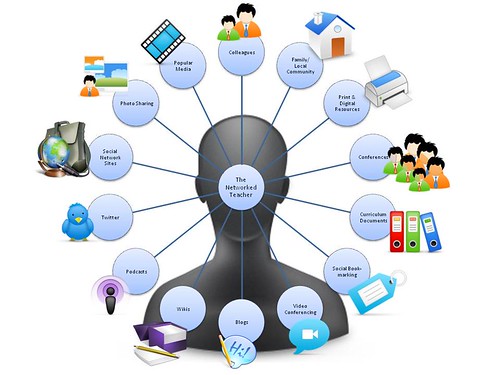
Networked teacher image via langwitches @ Flickr
Rock image via jasohill @ Flickr

Wine image via Joe Pitz @ Flickr
iPod image via Andrew* @ Flickr
Books image via librarybug @ Flickr
Butterfly bullet image via razZziel @ Flickr

Sunday, March 08, 2009

Pulling it all together online -- LibGuides? Netvibes? Pageflakes?

Research resources -- shared and organized in easily configured widgets/modules on tabbed pages -- that's what libraries using Web 2.0 tools like LibGuides, Netvibes, and Pageflakes can offer their customers. It's one of the quickest ways to create a library portal or home page.

LibGuides is not free, but it looks like it could be worth buying.

Check out the LibGuides Community page where you can browse for academic, public, and school libraries and see how they have used the product.

For example, see the library guides created by:
Buffy (alias The Unquiet Librarian) recently blogged about how much she loves LibGuides and she's someone who has been exploring the best means of providing students with research guides and pathfinders for some time now -- see her wiki: Research Pathfinders 2.0: Information Streams for Students.


Netvibes is the next best option -- and it's free. This is what I've been playing with for the past few weeks, inspired by these librarians:

The beauty of Netvibes is that anything I see on any of their pages, I can easily copy to my own by simply clicking "Share" on a particular widget. And everyone has both a private page and a public page, so you can play around with customizing widgets on your private page and then move them to the public sphere.

For example, I just copied over links to kids' magazines from Fiona, links on books and reading from Leanne, more book and reading links from Yvonne, links to audio book sites from Dianne, and dictionary websites from Kathy.

I like how Kathy has made a separate page for the PYP units of inquiry -- and I'll be doing that as well, but for now here's my initial effort:


Pageflakes is a similar tool that I have experimented with before, but then I recently read a blog posting which suggested Pageflakes might die (from lack of funding). So I immediately began exploring Netvibes and was thrilled to find so many good library examples out there to copy. But then just the other day there was an ominous blog posting about Netvibes! Well, I'm not giving up on Netvibes yet. But as a form of insurance I've also just requested a proper LibGuides demo (and formal quote). By the way, this is the official comment on costs:

The cost of an annual license depends on the size of your institution and the number of libraries involved. We try to customize the pricing for every client, to meet their specific needs (as well to fit within their budgets!). The annual license fee ranges from $899 to $2,999 ($549 for K-12 libraries). Most libraries would fall under the lower license range. Contact us with the info about your institution (FTE or # of card holders) and we'll give you an exact quote. Chances are, you'll be pleasantly surprised - LibGuides is a great deal, any way you look at it!
I haven't mentioned iGoogle personalized pages, though they're quite similar. You can also share widgets and tabs with other people, but they're designed more for personal homepages -- where someone is logged into their Google account. So if your students all have iGoogle pages, then you could publicize library-specific widgets for them to add to their homepages. And if you want to explore other options, see this list of "start page" tools via Delicious.

Speaking of library websites, there are two I've admired recently for their clean "Mac" look and layout, though only Leanne's was made on a Mac. The other was created using a free tool called Weebly.


p.s. Check out the screencasts/tutorials The Big House Library has made using Jing (a free screen capture/screencast tool) showing how to use their library catalog (Follett's Destiny). I plan to do the same (someday).


Sunday, February 15, 2009

Improving the inquiry process

Photos from Flickr: istlibrary
Learning from peers is powerful -- in the classroom and in life. I often get my share early on a Saturday morning, thanks to Skype and Beth Gourley, my friend and fellow teacher-librarian. When our video cameras come into focus, the difference in our locations is obvious. Beth, up in Tianjin, China, at this time of year is wearing a thick bathrobe and huddled under a duvet, while I, down in Singapore, lounge in sleeveless nightwear, cooled by a ceiling fan.

This week's treasures from Beth included an article she wrote last year for KnowledgeQuest called "Inquiry -- The Road Less Travelled" (Vol. 37, No. 1, Sept/Oct 2008) and some related photos. Unfortunately, the article is not yet available online, but should be eventually (and you could always write Beth and ask her to send you a copy.... )

In the article she describes the International School of Tianjin (an IBO school) and how the teaching team there has worked on improving inquiry in the classrooms and library, starting with a group exploration of inquiry and information literacy models.

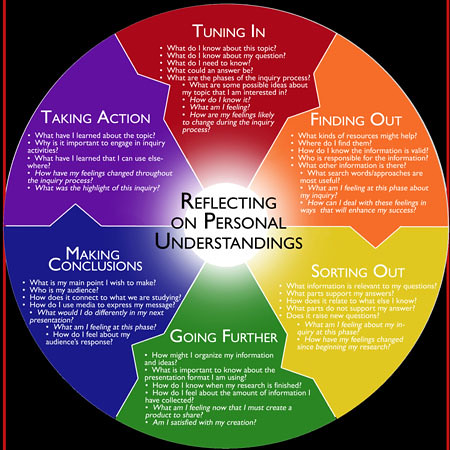
The result was a model adapted from three major sources: the spiral of making personal meaning and understanding from Barbara Stripling (2003), guiding questions from Jennifer Branch and Dianne Oberg (2005), and language from Kath Murdoch (2005). The secondary school version is shown above, and they have a similar one with simplified questions for the elementary school.

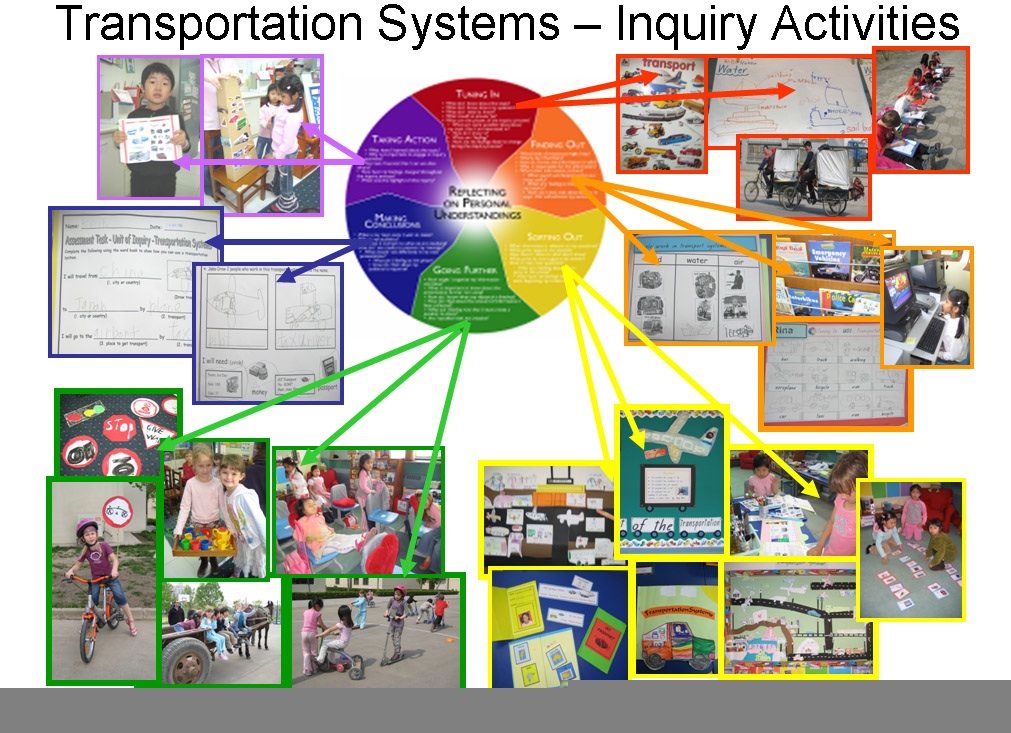
I especially love how teachers use the model as a framework for documenting the units of inquiry. Here is an example from one of their Kindergarten classes (click to enlarge):


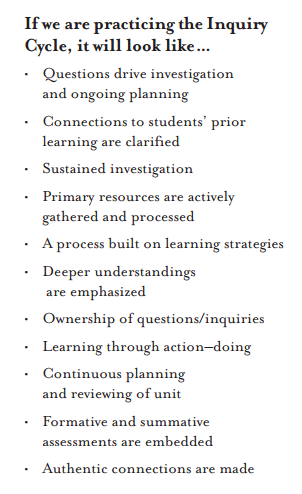
When Kath Murdoch came and worked with their teachers last year, they did a reflective exercise on their implementation of inquiry. Here is a partial summary of the remarks collected (also taken from the article):

They go on to create the list (below left).

Nothing radical there -- everyone struggling to improve their inquiry will recognize the items as common goals. Still it's good to be reminded of them.

Beth is also working on a wiki called Research Story, based on their inquiry model (which I trust she won't mind me sharing). Like all wikis, it's a work in progress. But I know it's made me want to go back and re-organize my own grade-level wikis around an inquiry model.


NB: The inquiry cycle image at the top was developed at the International School of Tianjin (IST) in 2007.
Sources for the image compilation-- as taken from the IST Flickr page:
Stripling, Barbara K. 2003. “Inquiry-Based Learning.” In Curriculum Connections through the Library, ed. Barbara K. Stripling and Sandra Hughes-Hassell, 3-39. Westport, Conn: Libraries Unlimited. Murdoch, Kath. 1998. Classroom Connections: Strategies for Integrated Learning. Ar-madale, Vic: Eleanor Curtain Pub.Branch, Jennifer, and Dianne Oberg. 2005 “Focus on Inquiry.” IASL. (accessed 6 May 2007).

Apture